
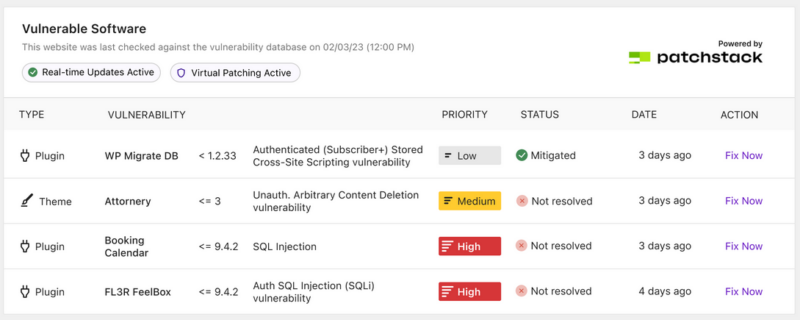
Vulnerabilities happen. What matters is how quickly you find them, how well you understand the risk, and how easily you can act. That’s why we’ve made major improvements to vulnerability scanning and reporting in Solid Security.
With the release of Solid Security Pro 8.6.0, you’ll see clearer insights, more frequent scans, and notifications that focus on what really matters.
What Changed
Patchstack Priority scoring
We’ve replaced the older CVSS scoring with Patchstack Priority. This system takes into account real-world factors like active exploit activity, availability of fixes, and the actual impact on WordPress sites. The result is a clearer picture of your risk profile so you can focus attention where it counts.
More frequent scans
Solid Security now scans more often, reducing the time between a new vulnerability emerging and when you hear about it.
- Pro users now get hourly scans, up from twice a day.
Smarter notifications
Vulnerability notification emails are now sent only when a new issue is found that meets your chosen priority threshold. That means fewer duplicate alerts and a sharper focus on what needs your attention.

Digest email updates
The digest email now includes a summary of the vulnerabilities currently active and those already mitigated. This makes it easier to stay on top of your site’s security posture in one place.
Why It Matters
These updates give you more visibility with less noise. You don’t have to parse CVSS scores or track down additional details across the web. With Patchstack Priority and improved scan cadence, Solid Security delivers the insight you need to respond faster and more confidently.
For Pro customers, hourly scans and Patchstack integration mean protection often comes before a vendor issues a fix. And when a virtual patch is not available, Patchstack Priority helps you understand the severity of the issue so you can decide your next move.
Get Started
These improvements are available now in Solid Security Pro 8.6.0.
Note: Update or install Solid Security Pro 8.6.0 in your WordPress site’s plugin installer. You may also download Solid Security Pro from your SolidWP member panel at my.solidwp.com.
Keep reading the article at Blog – SolidWP. The article was originally written by Sarah Ulmer on 2025-09-11 10:34:00.
The article was hand-picked and curated for you by the Editorial Team of WP Archives.